---
title: Embeddable Body Fat Percentage Chart (Free) | ProgressLens
url: https://progresslens.app/tools/body-fat-chart-embed/
language: en
updated: 2026-11-13
---

# Embed the body fat chart on your site

By the [ProgressLens team](https://progresslens.app/about/) · Updated November 13, 2026

Free to use on blogs, coaching sites and forums. Copy the code; the chart updates if we ever correct it.

Short answer

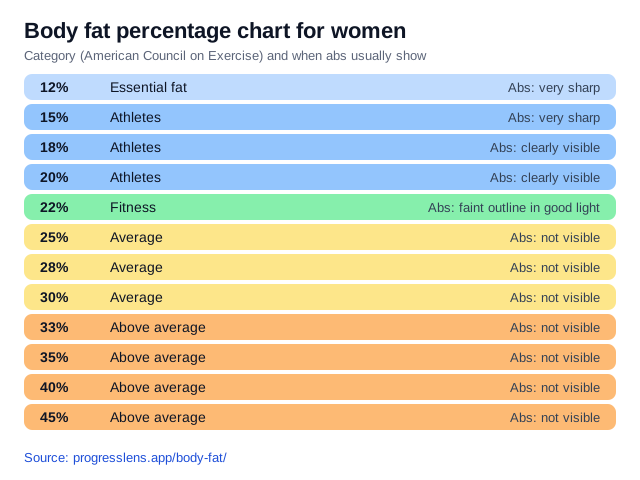
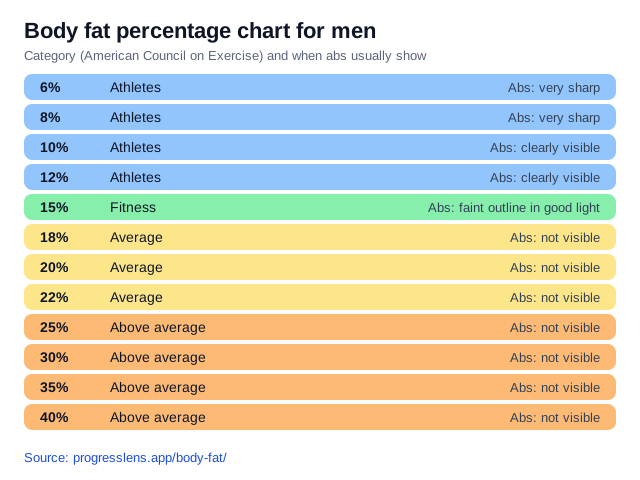
You can embed the ProgressLens body fat percentage chart for men or women by pasting a short image-and-link snippet. It’s free with a credit link, has no scripts, and shows ACE categories and when abs usually show.

## Body fat chart for men

Embed code<a href="https://progresslens.app/body-fat/" title="Body fat percentage chart"><img src="https://progresslens.app/embed/body-fat-chart-men.svg" width="640" alt="Body fat percentage chart for men: categories and abs visibility" loading="lazy"></a>
<p>Chart: <a href="https://progresslens.app/body-fat/">body fat percentage chart</a> by ProgressLens</p>

## Body fat chart for women

Embed code<a href="https://progresslens.app/body-fat/" title="Body fat percentage chart"><img src="https://progresslens.app/embed/body-fat-chart-women.svg" width="640" alt="Body fat percentage chart for women: categories and abs visibility" loading="lazy"></a>
<p>Chart: <a href="https://progresslens.app/body-fat/">body fat percentage chart</a> by ProgressLens</p>

## Terms

Free for any use, including commercial, as long as the credit link stays. The chart uses ACE categories and the abs-visibility levels from our [body fat chart](https://progresslens.app/body-fat/). No tracking, no scripts: it’s a plain image.

---
ProgressLens is an AI progress photo app for iPhone, iPad and Android that turns your check-in photos and tape measurements into a Progress Report: your body-fat range, what changed, whether you are losing fat or muscle, and whether to cut, lean bulk, recomp or maintain.
App Store: https://apps.apple.com/app/progresslens/id6806300575
Google Play: https://play.google.com/store/apps/details?id=app.progresslens